
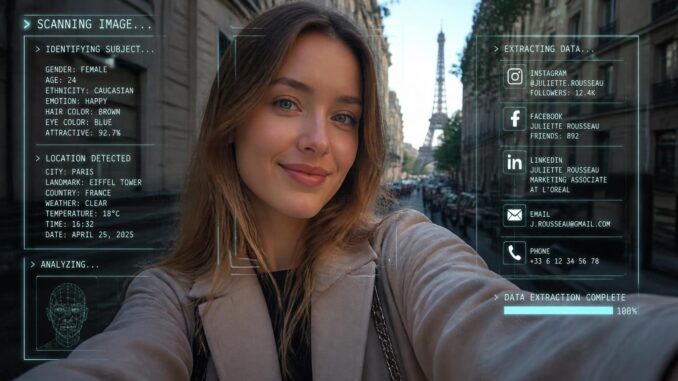
They say a picture paints a thousand words. The images on your phone paint much more than that.
In this article, we’ll look at:
Table of Contents
Let’s get into it.
“M” is for metadata
Most people think an image is just a single document. It’s a picture, right? Just a bunch of pixels carrying color information? There’s actually quite a bit more about you that the phone is capturing.
It’s more like two documents stitched together. There’s the image data, about which you know. Then there’s a connected text file full of additional information, including:
- Time and date information
- Exposure levels
- Geolocation data
- And more (that’s the interesting stuff you probably really don’t want to share)
Some of this data is so basic you wouldn’t want to do without it. Time and date tells you when the photo was taken. This is the kind of sortable, searchable data that makes your iPhoto library actually usable. The exposure levels can help you understand the lighting conditions—useful if you’re into that.
Geo information can tell someone where you are, even what building you were in when the picture was taken. Maybe that’s no big deal. Maybe all that information is public anyway. Or maybe it’s not.
Your location says a lot about you. Most people wouldn’t allow friends or family to track their iPhone. But sending a picture can be doing just that.
And there’s still so much more data beyond these basic trackers.
Your metadata and you
Metadata is simply useful; that’s why it exists. With all this data, decades worth of digital images can be easily managed, indexed, and searched without you ever having to manually tag something.
However, awareness is key. Just because metadata is helpful and makes your life easier, doesn’t mean it’s always good. You should be aware of what it’s capturing and decide for yourself if this is data you want public. For all intents and purposes, you should consider your digital content public as soon as you share it, even if you shared it privately.
Leaving aside basic metadata like time, photographic, or geographic, your photo says much more than you think it does. Look at the photo. Is there a document or handwritten note in the camera’s view containing credit card numbers, social security numbers, passwords, or private messages? Even in the background, or skewed in some way, character recognition software can scan paper (even handwriting) and glean sensitive data. So you must be aware not only of what metadata is being recorded about you, but what’s simply sitting out in the open.
We’re just scratching the surface here. Facial recognition software has been around for years and can pull out faces and tell you who among your friends and family are in the picture. But now with AI, it would be trivially easy to use skin, eyes, and facial expression to adduce all kinds of biometric and psychological data. Welcome to the brave new world. It’s gonna be fun.
How to fix this
Some messaging apps strip metadata. This is a privacy feature. Check to see if your favorite apps do this.
Bear in mind, sending raw files over email, Google Drive, or some other file transfer protocol will send all raw data including metadata. Again, check your app to see what it’s doing.
Internal phone settings may also mitigate data collection. Check to see if your camera, phone, or device gives you any control over what is recorded. It’s possible you could turn some of this data collection off.
As I often say, there’s no fixing this beyond simple awareness. Before sending a photo anywhere, think about it:
- What’s in the photo? Consider foreground and background elements. All of it.
- Is there anything sensitive in the content of the image that you would prefer to conceal?
- Is the phone recording your location? Where are you? Who are you with?
- Does your social media or messaging app strip metadata?
Now that you have the information, here’s what I want you to do. Before sharing anything on the web, picture my smiling face and wagging finger asking you, “Hey, you sure about sending that?”
And if you’ve enjoyed this content, consider buying my books or subscribing to my newsletter.
- I’m looking for beta readers for my hacker novel, Hard Pass
- Check out my eBooks: Emacs For Writers and Git For Writers
- Subscribe to my newsletter for occasional updates from me about similar topics
My goal here is to help people live better and more fulfilling lives alongside computers. You can help me in this mission by sending this article to someone who you think might need to read this. Point and click. Copy and paste.
Thanks for reading.
Leave a Reply