
I recently wrote a post about writerdecks and minimalist “distraction-free” writing environments in general. I concluded that the most minimalist writing environment you could get is a cheap notebook and Bic pen you could get at any supermarket.
However, as a digital minimalist, and one who writes at a high enough volume, a writerdeck starts to make a lot of sense. So I thought I’d try to make one.
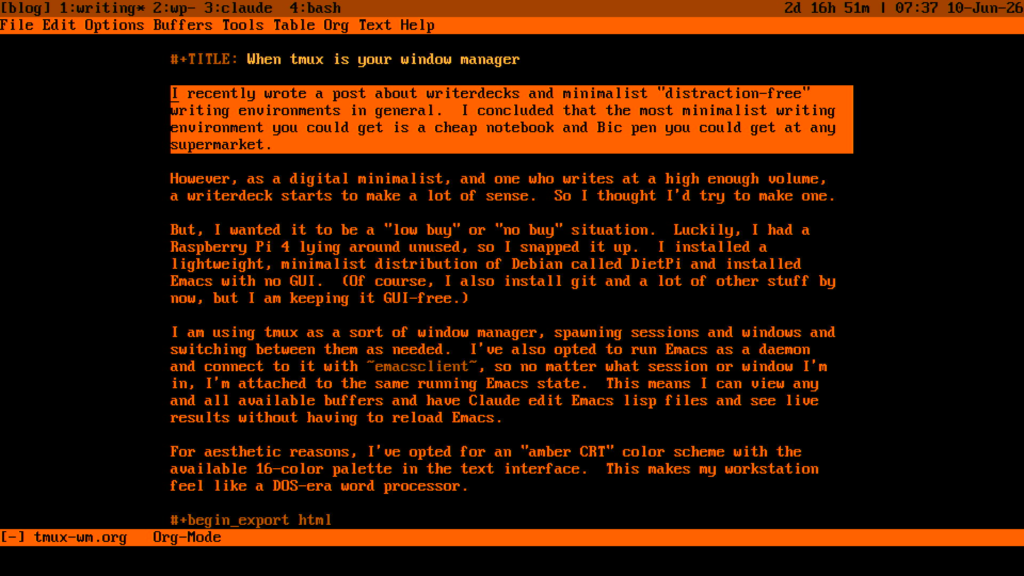
But, I wanted it to be a “low buy” or “no buy” situation. Luckily, I had a Raspberry Pi 4 lying around unused, so I snapped it up. I installed a lightweight, minimalist distribution of Debian called DietPi and installed Emacs with no GUI. (Of course, I also installed git and a lot of other stuff by now, but I am keeping it GUI-free.)
We’re talking MAXIMUM digital minimalism here.
I am using tmux as a sort of window manager, spawning sessions and windows and switching between them as needed. I’ve also opted to run Emacs as a daemon and connect to it with emacsclient, so no matter what session or window I’m in, I’m attached to the same running Emacs state. This means I can view any and all available buffers and have Claude edit Emacs lisp files and see live results without having to reload Emacs.
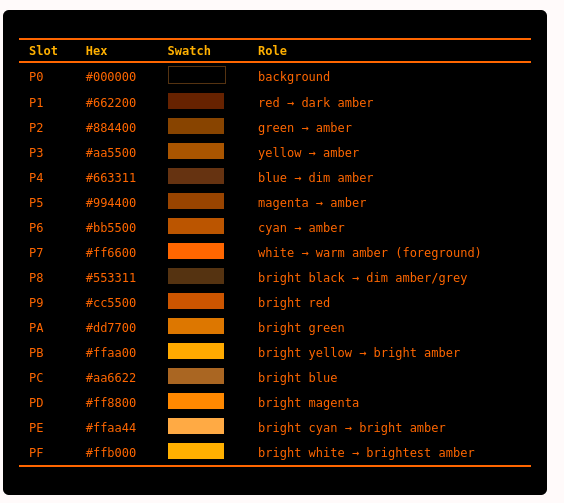 For aesthetic reasons, I’ve opted for an “amber CRT” color scheme with the available 16-color palette in the text interface. This makes my workstation feel like a DOS-era word processor.
I love this so much it’s hard to contain my excitement.
I plan on making a more in-depth video on this topic later to actually demonstrate the system live and show some of the config-mongering I went through to get it just right.
I’ve really enjoyed the results as I’ve grown accustomed to a purely text-based (no mouse!) workflow. The only downside is that it reverses the classic Emacs paradigm of having Emacs colonize my desktop. Instead, Emacs is a guest in tmux. C’est la vie.
Thanks for reading, be sure to check out my books about similar topics: Emacs For Writers and Git For Writers.
Since you are going with Raspberry Pi why not find an LCD panel, set it to portrait mode and find a mechanical keyboard and go full steampunk.
Priceless: ‘I love [“amber CRT” color scheme] so much it’s hard to contain my excitement.’
I preferred the green CRT, but I share your enthusiasm!
I have a green scheme too, but amber is so warm and easy on the eyes.
The screenshot reminds me of the Brother word processor I used in college. The nostalgia center in my brain is tingling.